
What headless WordPress actually is, when it
If you have been researching modern website development and WordPress development recently, you have probably come across the term "headless WordPress." Most explanations are written for developers, full of terms like REST API, GraphQL, and static site generation. They assume you already know what decoupled architecture means.
This article explains headless WordPress in plain language. What it actually is, when it makes sense for a real business, when it does not, and what it costs compared to a standard WordPress build.
What Traditional WordPress Looks Like
Before explaining headless, it helps to understand how WordPress normally works.
In a standard WordPress setup, everything lives together. WordPress stores your content in a database, builds the page using PHP templates, and sends the finished HTML to the visitor's browser. The content layer, the logic layer, and the display layer all run on the same server and talk to each other directly.
This works well for most websites. It is straightforward to build, easy to host, and your content team can log into the familiar WordPress dashboard to write and publish.
The limitation is that the display layer is tied to WordPress. Your theme controls how everything looks and the way pages are built is dictated by WordPress's PHP rendering process. For most businesses, this is fine. For some, it becomes a constraint.
What Headless WordPress Actually Means
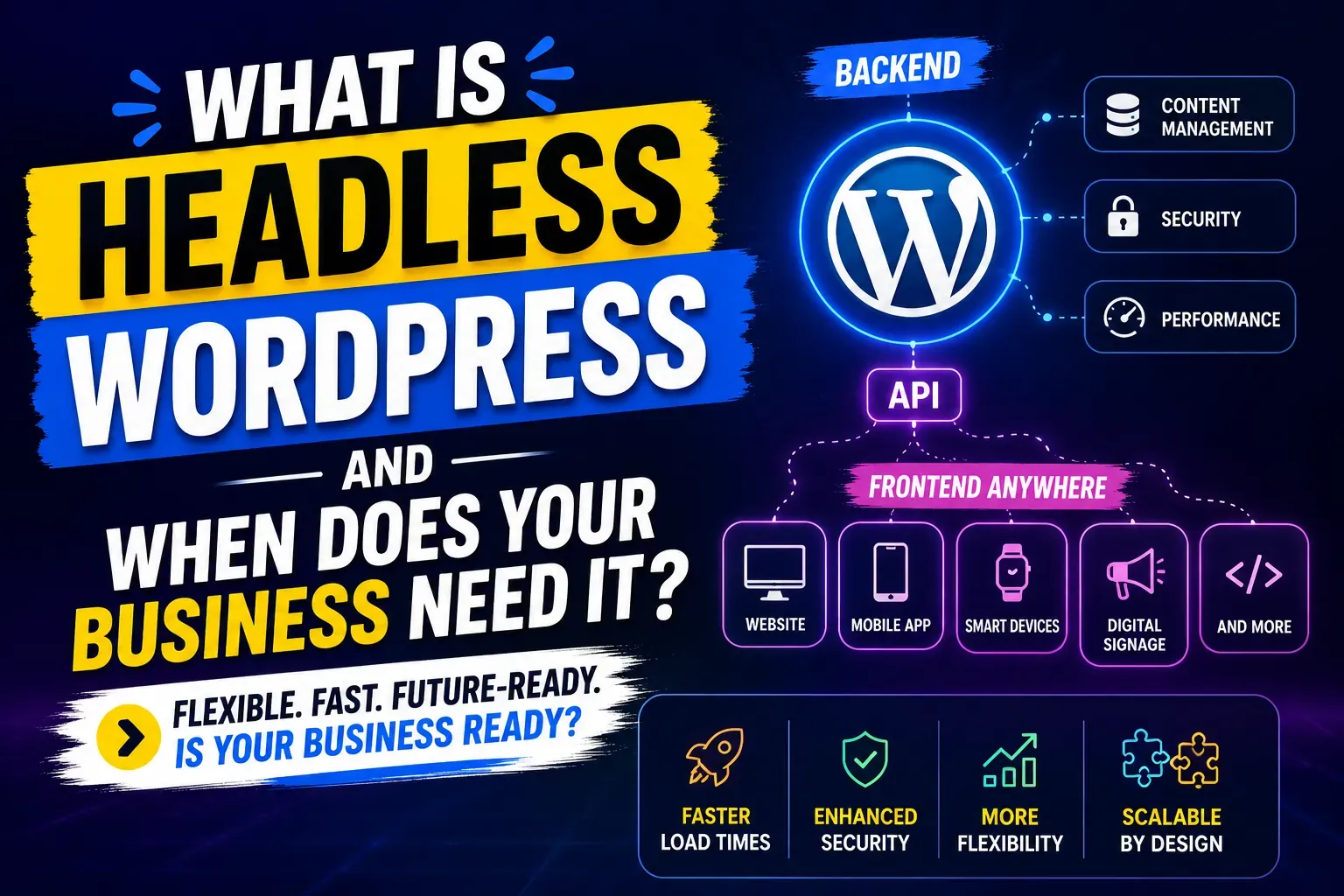
Headless WordPress separates the content management from the display.
WordPress stays in the background doing what it does best: storing content, managing users, handling the editorial workflow, and running the media library. Your team still uses the same WordPress dashboard they are familiar with. That part does not change.
The frontend, meaning the part your visitors actually see in their browser, is built separately using a modern JavaScript framework. React and Next.js are the most common choices in 2026. Astro, SvelteKit, and Nuxt are also used depending on the project's requirements.
These two layers communicate through an API. When a visitor loads a page, the frontend application requests the content from WordPress, WordPress sends it, and the frontend renders it. This happens very fast because modern JavaScript frameworks can pre-build pages ahead of time rather than building them fresh on every visitor request.
The "headless" name comes from removing the "head," which in this context means the presentation layer. WordPress becomes a body without a head, managing content invisibly in the background.
Why Businesses Choose Headless WordPress
Faster load times. Traditional WordPress builds pages on demand using PHP. Every visitor request triggers a server-side process. With headless, the frontend can be pre-built into static files that load almost instantly from a CDN. For high-traffic sites, this speed improvement is significant and directly affects both user experience and search rankings.
Delivering content across multiple platforms. If your business runs a website, a mobile app, a kiosk, and an internal dashboard all from the same content, a headless setup means you manage that content in one place and push it everywhere. In a traditional WordPress setup, your content is locked to the website. In a headless setup, your WordPress CMS becomes a central content source that feeds any platform that can make an API request.
More control over the frontend experience. JavaScript frameworks like Next.js give developers tools that are simply not available in WordPress theme development. Complex interactive interfaces, real-time features, smoother page transitions, and more sophisticated user experience patterns all become easier to build.
Better separation of concerns for larger teams. When a development team includes dedicated frontend engineers who work in React every day, forcing them to work within WordPress theme constraints is inefficient. A headless architecture lets frontend developers work in their preferred environment while backend developers manage the WordPress setup separately.
Stronger security posture. When WordPress is not publicly exposed as the web server, the attack surface shrinks. The WordPress admin and database sit behind the API layer rather than being the public-facing application. This does not make a headless site immune to security issues but it removes some common attack vectors.
When Headless WordPress is the Right Choice
Not every business needs headless. Here is when it genuinely makes sense.
You have high traffic and Core Web Vitals performance is critical. A news publication, a large ecommerce platform, or a high-profile marketing site where page speed directly affects revenue are cases where the performance gains from headless justify the build cost and complexity.
You need to publish content to multiple platforms simultaneously. If the same content needs to appear on your website, a mobile app, a partner portal, and a digital display, headless WordPress as a central content hub is the cleanest solution. Managing separate content sources for each platform is unsustainable at scale.
Your development team works primarily in React or another JavaScript framework. If you already have frontend engineers working in Next.js and they are being slowed down by WordPress theme constraints, a headless setup makes the team faster and reduces context-switching.
You are building a web application rather than a website. If what you need is closer to a web app with real-time data, complex interactive states, and user-specific content, a JavaScript frontend with WordPress as the content backend is a natural fit.
The site will scale to very high page counts or traffic. Large media sites, directories, and platforms with thousands of pages benefit from the scalability headless architecture provides at the infrastructure level.
When Headless WordPress is Not the Right Choice
This is important. Headless WordPress is not always better. For many businesses, it adds complexity and cost without proportional benefit.
You run a standard business website. A 10 to 20 page company website with a blog does not need headless architecture. A well-built traditional WordPress site with a custom theme, good hosting, and proper caching performs well and is much simpler to maintain.
Your team manages content without technical help. The WordPress editor your content team knows is fully intact in a headless setup. However, any frontend changes require a developer who knows React or Next.js, not just WordPress. If your team needs to make layout changes independently, headless introduces a dependency that a traditional build avoids.
Budget is a primary constraint. Headless builds cost more to develop, deploy, and maintain. The frontend and backend become separate infrastructure concerns. Hosting costs are higher. Developer skills required are more specialised and therefore more expensive. If the budget for the project is under £15,000, a headless build is rarely the right recommendation.
You need a WooCommerce store. WooCommerce in a headless setup is significantly more complex to build than a traditional WooCommerce implementation. Most of WooCommerce's frontend functionality needs to be rebuilt from scratch in the JavaScript framework. This is achievable but expensive and time-consuming. For most ecommerce builds, a traditional WordPress and WooCommerce setup performs well enough and costs far less.
Headless WordPress Vs Traditional WordPress: a Direct Comparison
| Factor | Traditional WordPress | Headless WordPress |
|---|---|---|
| Build cost | £3,000 to £25,000 | £25,000 to £60,000+ |
| Build time | 4 to 10 weeks | 10 to 20 weeks |
| Page load speed | Good with proper setup | Excellent |
| Content editor experience | Familiar WordPress dashboard | Same WordPress dashboard |
| Frontend flexibility | Limited by theme | Full control |
| Multi-platform delivery | Website only | Website, app, any platform |
| Maintenance complexity | Low to medium | Medium to high |
| Developer skills required | WordPress/PHP | WordPress/PHP + React/Next.js |
| Best for | Most business websites | High-traffic or multi-platform needs |
The Technology Behind Headless WordPress in 2026
If you are evaluating this for your business and want to understand the technical choices involved, here is what is standard in 2026.
Content API layer: WordPress provides a REST API built into core that requires no additional plugins. WPGraphQL is the preferred choice for most headless builds because it lets developers query exactly the data they need in a single request rather than fetching entire objects.
Frontend framework: Next.js is the most common choice in 2026 for headless WordPress projects. It handles server-side rendering, static site generation, and incremental static regeneration, which covers most performance scenarios. Astro is a strong choice for content-heavy sites where minimal JavaScript is preferred. Nuxt is used by teams with Vue experience.
Hosting: The WordPress backend typically runs on managed WordPress hosting such as WP Engine, Kinsta, or Cloudways. The frontend deploys to Vercel or Netlify, which are purpose-built for JavaScript frontend frameworks. This means two hosting accounts rather than one.
SEO: Contrary to early concerns, headless WordPress can be fully SEO-optimised. The Yoast or RankMath plugins continue working on the WordPress backend and their data passes through the API to the frontend. Schema markup, meta tags, and sitemap generation all work in headless setups when configured correctly.
What Headless WordPress Costs in 2026
These are realistic project costs based on agency market rates.
Headless WordPress with Next.js frontend (standard business or marketing site): £25,000 to £60,000 with a remote-first agency like ExoGrow £40,000 to £100,000+ with a UK or US-based agency at standard market rates
Headless WordPress for a high-traffic media or publishing site: £30,000 to £80,000 depending on scope
Monthly hosting for headless (WordPress backend + Next.js frontend): £100 to £400 per month depending on traffic
Monthly maintenance: Higher than traditional WordPress because two environments need monitoring. From £800 per month with a specialist.
The ExoGrow pricing advantage applies to headless builds as it does to all WordPress projects. The remote-first structure removes the overhead that drives up costs at UK and US-based agencies. You get the same technical quality at a lower total project cost.
How ExoGrow Builds Headless WordPress Projects
ExoGrow builds headless WordPress projects using Next.js as the default frontend framework and WPGraphQL for the API layer. Projects are delivered in phases.
Phase one covers the WordPress backend setup, CMS architecture, content types, and API configuration. Phase two covers the Next.js frontend, component library, and page templates. Phase three covers integrations, performance testing, and deployment.
Your content team gets a full training session on the WordPress dashboard before handover. From their perspective, the experience is identical to a traditional WordPress setup. The technical complexity sits in the architecture, not in the day-to-day content workflow.
For businesses considering headless, ExoGrow offers a scoping call where we look at your specific requirements and give an honest recommendation on whether headless is actually the right fit. Sometimes the honest answer is that a well-built traditional WordPress site achieves everything you need at a third of the cost.
Book that conversation at exogrowsolutions.com/contact.
Frequently Asked Questions
Q: What is the difference between headless WordPress and traditional WordPress— A: Traditional WordPress builds and delivers the entire website from one system. Headless WordPress uses WordPress for content management only and delivers the frontend through a separate JavaScript application. The result is more performance and flexibility at higher cost and complexity.
Q: Does headless WordPress hurt SEO— A: No. Headless WordPress can be fully optimised for search. Meta tags, schema markup, sitemaps, and canonical URLs all work through the API layer. The SEO plugins your team already uses continue operating on the WordPress side.
Q: Is headless WordPress faster than regular WordPress— A: Generally yes, particularly for first load and Core Web Vitals scores. A Next.js frontend pre-builds pages as static files that load from a CDN. Traditional WordPress builds pages on each request, which is slower under load. That said, a well-optimised traditional WordPress site with good hosting and caching performs well enough for most business websites.
Q: How long does a headless WordPress project take— A: At ExoGrow, a standard headless WordPress project takes 10 to 16 weeks from scoping to launch. This covers backend setup, API layer, frontend build, integrations, testing, and deployment. Traditional WordPress builds take 4 to 8 weeks for comparison.
Q: Can my content team still use WordPress if we go headless— A: Yes. Your content editors use the same WordPress dashboard they already know. Headless architecture changes nothing about the content editing experience. The difference is entirely on the technical side.
Q: Does ExoGrow build headless WordPress sites— A: Yes. ExoGrow builds headless WordPress projects using Next.js and WPGraphQL. We also build traditional WordPress sites and help businesses decide which approach is right for their specific requirements. Reach us at exogrowsolutions.com/contact.
Q: Is WooCommerce compatible with headless WordPress— A: Yes but it is significantly more complex. Most WooCommerce frontend functionality needs to be rebuilt in the JavaScript framework. For most ecommerce projects, traditional WooCommerce is the better recommendation unless the business has specific multi-platform or performance requirements that justify the additional cost.